
Anyone who keeps photos and videos for many years eventually runs into the same problem: filenames become meaningless. Different cameras, phones, and software all use their own naming conventions, such as IMG_4321.JPG, PXL_20240118_103806764.MP4 or DSC00987.ARW. These names are not very helpful when synchronizing files coming from multiple devices.
When photos from different devices and years are combined into a single archive, filenames tell you almost nothing about when the image was actually taken. While some filenames contain a date and time, it is the metadata that usually contains the real capture time.
The challenge is turning that metadata into a safe and deterministic renaming workflow for large photo libraries.
ChronoName was built to solve exactly that problem.
After building DedupTool to remove duplicate photos safely, another recurring problem in large photo libraries became obvious: inconsistent filenames. ChronoName was created to address that problem.
The Real Problem: Timestamp Chaos
At first glance renaming photos by capture time seems straightforward: read the EXIF timestamp and format the filename. In practice things quickly become messy because different devices store timestamps differently. Typical examples include: still images using EXIF DateTimeOriginal, videos using QuickTime CreateDate, timestamps stored without timezone information, videos stored in UTC, exported or edited files with altered metadata and files with broken or placeholder timestamps.
If these timestamps are interpreted incorrectly, chronological ordering breaks. A photo and a video captured at the same moment might suddenly appear hours apart.
The real challenge is therefore not reading metadata, but interpreting it consistently.
The Design Goal
ChronoName follows four guiding principles: deterministic naming, safe batch processing, reversible transformations, and an auditable archive state. The script automates the well-known metadata utility ExifTool and adds a safe workflow layer around it. When it comes to unlocking the metadata hidden inside media files ExifTool is unsurpassed! ChronoName focuses on turning that metadata into reliable filenames across entire folders of images and videos.
Deterministic Timestamp Policy
A key design decision is to explicitly define how timestamps from different media types are interpreted. For still images EXIF timestamps are assumed to represent the local capture time. For videos, QuickTime timestamps are interpreted as UTC and then converted to the timezone named in the ChronoName settings.
This policy solves a common issue where videos and photos taken at the same moment appear misaligned when sorted. After normalization, the new filenames reflect the true chronological order of events.
Filename Structure
Let’s look at the filename structure. ChronoName generates filenames using a deterministic format with the bracketed components optionally, used only when necessary to distinguish between files: YYYYMMDD_HHMMSS[_milliseconds][__DEVICE][_counter].ext.
| Naming Examples | |
| 20240118_173839.jpg | this is the default |
| 20240118_173839_234.jpg | a trailing counter is added when several files share the same creation time |
| 20240118_173839__SONY-A7M3.arw | maker-model information can be added if requested |
This convention ensures that files automatically sort chronologically while remaining easy to read.
Safety as a Design Constraint
Renaming tens of thousands of files can be risky. A mistake can destroy the logical structure of an archive. ChronoName therefore uses a conservative workflow. Dry-run mode(–dry-run) shows you the planned changes without actually changing any files.
ChronoName also creates undo logs. Each run writes a log file: rename_log_XXXXXXXX.json. This log records every rename operation and allows a full rollback. Starting ChronoName again with the added argument: –undo rename_log_xxxxxxxx.json undoes the previous renaming. This makes the process fully reversible.
Auditable Archive State
Beyond undo logs, ChronoName can also write a collection manifest. This manifest describes the normalized archive state after renaming. Per file we record the following characteristics:
- the new filename;
- the timestamp used for naming;
- which metadata field supplied that timestamp;
- the original filename;
- optional device information.
An example entry could look like this:
{
  "file": "20240118_173839.mp4",
  "timestamp": "2024-01-18T17:38:39",
  "timestamp_source": "CreateDate",
  "original_filename": "PXL_20240118_103806764.mp4"
}
This turns batch renaming into an auditable transformation of the collection rather than a one-way operation.
Handling Broken Metadata
Real photo archives often contain files with incorrect timestamps. Common examples include placeholder dates such as 1970-01-01 (the Unix epoch), invalid QuickTime metadata, images exported through messaging apps (like WhatsApp) that remove metadata or incorrectly migrated files.
ChronoName therefore applies a simple plausibility filter when selecting timestamps. Only timestamps that fall within a reasonable time range are accepted. Implausible metadata is ignored in favor of other available fields.
This small safeguard prevents rare but disruptive ordering errors.
Why Not Let Photo Software Handle This?
Applications such as Lightroom or Apple Photos manage timestamps internally, but many photographers also keep filesystem-based archives. Advantages of filesystem-level naming include independence from specific software, easier backups and long-term preservation and compatibility with any image viewer.
ChronoName focuses on making those archives chronologically meaningful at the filesystem level.
Implementation Notes
The script is written in Python and relies on ExifTool for metadata extraction.
The workflow looks roughly like this:
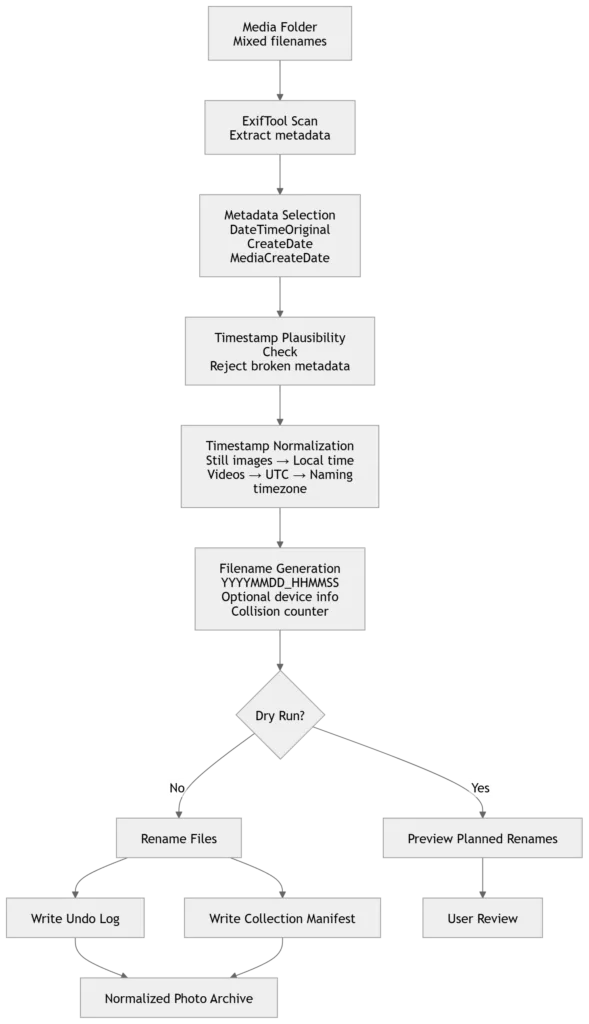
ChronoName supports common photo and video formats including: jpg, jpeg, heic, png, dng, cr2, cr3, arw, nef, raf, mp4, mov, m4v.
A Practical Archive Workflow
ChronoName works well as part of a simple archive-cleaning process alongside DedupTool: ChronoName -> deterministic filenames -> DedupTool -> duplicate reduction.
ChronoName first ensures that files have consistent chronological names. DedupTool can then safely detect redundant copies. Together they form a practical workflow for maintaining large photo libraries.
Final Thoughts
Renaming photos by capture time sounds simple. In practice the hardest part is not reading metadata but interpreting it consistently and applying the transformation safely.
ChronoName was designed to make that process deterministic, reversible and auditable.
Because when dealing with thousands of personal photos, confidence matters more than automation.
Download and Usage
ExifTool by Phil Harvey can be downloaded for Windows and MacOS from the official website.
The easiest setup is to download the ExifTool executable version and unpack it into the folder where ChronoName will run. This will add a child folder exiftool_files, which should remain in place.
Once ChronoName is unpacked into the same directory, the tool is ready to use.

A short version of this article is also published on LinkedIn