
What’s new in 0.4.1
The package now comes with:
- A graphical Crypto Archive Manager
- Recoverable quarantine and confirmed permanent deletion
- A shared SQLite metadata index
- Two package-installed companion applications
This gives readers the release summary without turning the article into a changelog.
Introducing the Crypto Archive Manager in hdw_crypto_data 0.4.1
Downloading historical crypto data is necessary for technical analysis or model training. Acquiring the raw material is the first essential step in many data processing workflows. At the time, you probably don’t give it much further thought, but as an archive grows over time, you will likely start to wonder what’s in your storage. Which assets are actually present? Which intervals per asset have been collected? How many files belong to each asset, what period do they cover, and which files can be removed safely?
Those questions are difficult to answer by manually browsing the machine-oriented directory structure we conveniently took over from the source of that data, Binance Vision. This structure works very well for deterministic acquisition, but it was never intended as a user-friendly interface for archive-management. Therefore hdw_crypto_data 0.4.1 now adds a second companion application: the Crypto Archive Manager.
The existing showcase application demonstrates how the package acquires and combines historical and recent cryptocurrency data into a standardized broadly useable format. The new manager application addresses what happens afterwards: understanding, validating and selectively cleaning the archive that has accumulated on disk.
Together, the two applications now cover a broader data lifecycle:

When a useful directory becomes difficult to manage
In the financial world, the spot market is a public market where financial instruments or commodities are traded for immediate delivery, unlike derivatives whose value depends on future or conditional obligations. Binance uses spot to distinguish these markets and the local archive mirrors that provider structure. So, the root folder of our archive location is named spot.
Binance Vision, our source of historical data, organizes its data by market, frequency, symbol and interval. A local archive can therefore contain paths to folders such as:
- spot/daily/klines/BTCUSDT/1h/…
- spot/monthly/klines/ETHUSDT/1h/…
That hierarchy is useful to software. It allows a downloader to construct predictable paths and find the correct daily or monthly archive files.
For a human being however, the useful information is fragmented, distributed across many nested folders. Determining the contents of the archive may require counting files, interpreting filenames and sometimes opening CSVs to inspect their actual timestamps.
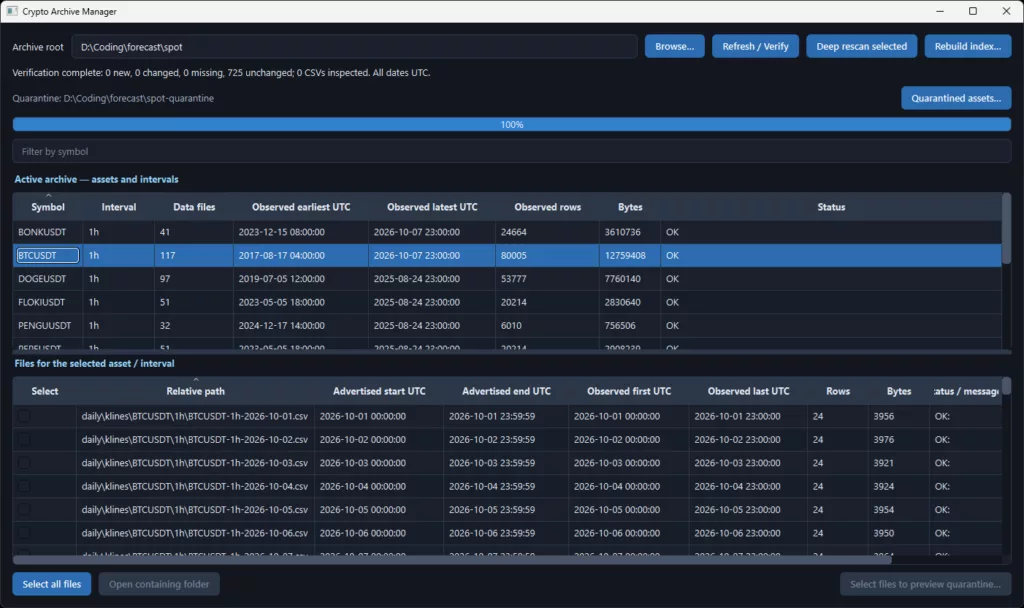
The Archive Manager turns that filesystem into a human-readable inventory. Its main view summarizes the archive by asset and interval, showing information, such as:
- Number of recognized files;
- Earliest and latest observed data;
- Total row count, where known;
- Disk usage;
- Validation status;
- Warnings for malformed, unreadable or unsupported files.
Selecting an asset reveals its individual files and distinguishes between two forms of coverage: the advertised coverage, the period suggested by the Binance filename and directory structure, and the observed coverage,the first and last valid candle timestamps actually found inside the CSV. We show this because a filename can indicate a complete day or month while the contents are partial, malformed or otherwise different. Conversely, partial coverage may be legitimate for a newly listed asset. The manager reports the difference without automatically deciding that a file is disposable.
Selective cleanup without immediately deleting data
Archive management can become risky when inspection and deletion are combined too casually. The manager therefore uses a deliberate two-stage cleanup model.
First level: recoverable quarantine
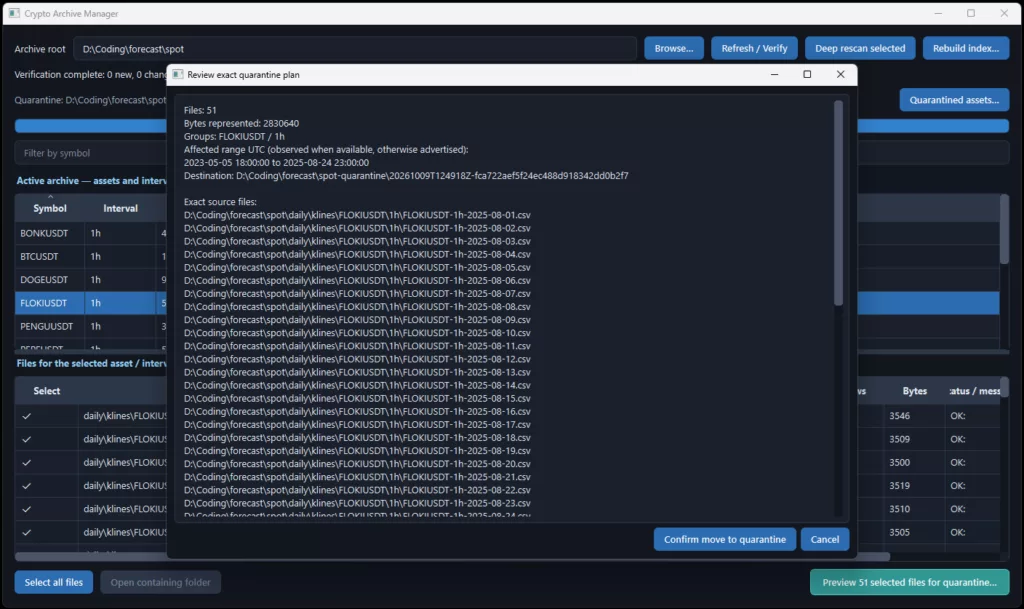
The user selects individual files, previews the exact consequences and explicitly confirms the operation. The preview shows:
- Exact source files
- Assets and intervals affected;
- Date coverage;
- Total bytes moved;
- Validation warnings;
- Quarantine destination.
Confirmed files are moved from the active spot archive into a separate quarantine area.
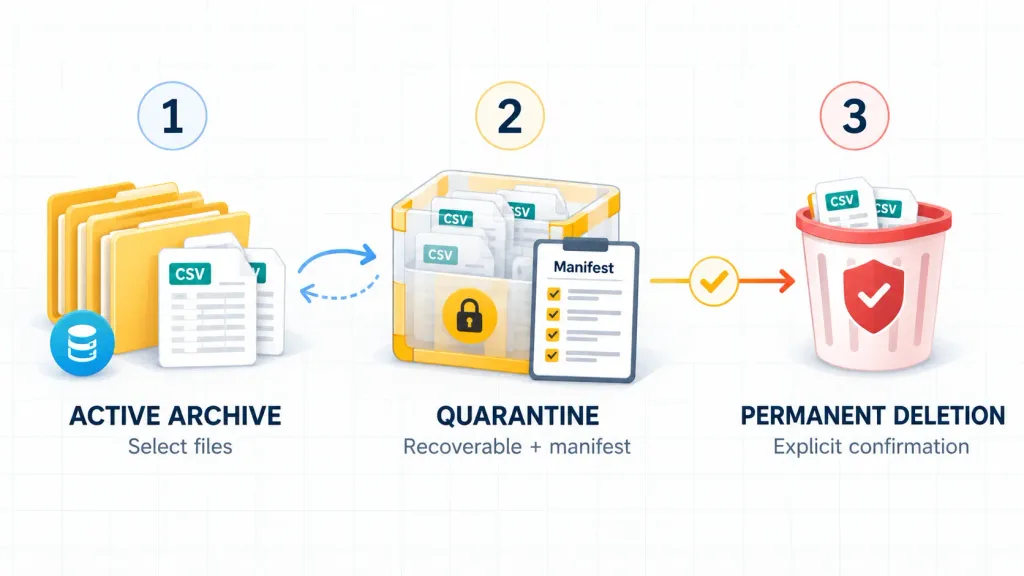
Every operation receives a machine-readable manifest recording original and quarantine locations, file identity, timestamps and outcomes. Nothing is permanently deleted at this stage. Failed or interrupted operations report precisely which files were moved, which failed and which were not attempted.
Second level: deliberate permanent cleanup
Once quarantined material has been reviewed, the manager provides an intentionally constrained second level. Quarantined files can be grouped by asset and permanently removed only after a separate preview and exact symbol confirmation.
This produces a clear safety gradient: Select precisely → quarantine recoverably → delete conclusively. Permanent cleanup never operates directly on the active spot archive. It applies only to material that has already passed through the recoverable quarantine stage.
Fast startup without making SQLite the truth
The first working manager exposed a practical problem: opening the application twice required recounting and reinspecting the archive. That was correct, but unnecessarily time-consuming when nothing had changed. Version 0.4.1 therefore now adds a shared SQLite archive index under a metadata directory beside the spot archive location.
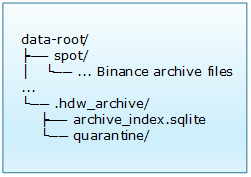
The index stores metadata, not the spot market-data. It contains file identities, symbols, intervals, advertised and observed ranges, row counts, sizes and validation results.
The governing design rule imposes a strict division of responsibility: writers keep the cache current; the manager verifies and repairs it; the filesystem remains authoritative.
The acquisition components update the index after a market-data file has been successfully committed. The manager can then show cached summaries immediately and verify the archive in the background. New or changed files are inspected deeply; unchanged files retain their cached results.
Manual filesystem changes remain possible. If a user copies, edits or removes files outside the package, the next verification reconciles the index with the actual contents of the spot folders. The database can also be deleted and rebuilt. Losing it does not mean losing market data, because the archive—not SQLite—remains the source of truth.
What changed in the acquisition pipeline
The Archive Manager is the visible feature, but release 0.4.1 also changes the underlying package components that write archive data. The Binance Vision client, the Vision dumper and the total-dataset builder now participate in archive-index maintenance. Their write sequence follows this order: acquire data, validate and normalize, write temporary output, atomically commit the final file and finally update the archive index.
Temporary or partially written files are never entered as valid archive records. If index maintenance fails after a successful file commit, the market-data write remains valid and the manager can repair the index during a later verification. This creates a clear separation of responsibilities. The filesystem does not depend on SQLite to remain valid, the data pipeline does not depend on the GUI, and the Archive Manager consumes the same archive and index services as the writers.
Cached does not mean blindly trusted
At startup, the manager can display cached inventory before it has opened every market-data file. For each path, it compares inexpensive filesystem properties such as file size and nanosecond modification time. Only new, changed or previously uninspected files require a deeper content read.
The application distinguishes among:
- Cached inventory loaded;
- Archive verification in progress;
- Verification complete;
- Verification pending;
- Index unavailable.
Users can request an incremental refresh, a deep rescan of the selected asset and interval, or a complete index rebuild. This avoids presenting old information as freshly verified while preserving fast startup.
Measured improvement
In a synthetic test archive containing 40 CSV files and 9,600 rows, the implementation produced the following local measurements:
| Operation | Time | CSV content rereads |
| Initial deep verification | 0.7755 seconds | 40 |
| Load cached inventory and summaries | 0.0018 seconds | 0 |
| Verify an unchanged archive | 0.0201 seconds | 0 |
These figures are local measurements rather than performance guarantees. The more important property is that an unchanged archive requires no CSV content rereads. The manager still traverses filesystem metadata during verification. That is necessary to detect manual changes. The expensive content inspection, however, is limited to files that may actually have changed.
Engineering safeguards: concurrency and recovery
The manager and the acquisition pipeline may occasionally access the index at the same time. SQLite therefore uses short transactions, separate connections and write-ahead logging where supported. No database transaction remains open while downloading data, parsing large CSVs, waiting for confirmation or moving archive files.
If verification is interrupted, the index remains marked as requiring another check.
If the database is locked, read-only, corrupt or incompatible, the manager remains usable and can fall back to filesystem inspection. A rebuild reconstructs the derived metadata without changing the market-data archive or quarantine manifests. This makes the cache useful without allowing it to become a single point of failure.
Two installed applications, one package
With version 0.4.1, the project is no longer only a collection of data-access classes accompanied by repository examples. It now provides two recognizable companion applications: the collection showcase demonstrates acquisition, standardized datasets and analytical reuse, and, the crypto archive manager provides visibility and controlled maintenance of the local archive.
The canonical application implementations belong with the package so they can be launched after installation. Repository examples can remain as small educational wrappers, but users should not need to clone the repository to run a supported application.
GUI dependencies remain optional so that importing and using the data package does not require a desktop environment.
Installation and launch
Install the package from PyPI: python -m pip install hdw-crypto-data
Launch the archive manager with: python -m hdw_crypto_data.archive_manager_gui
Use the showcase data collector: python -m hdw_crypto_data.showcase_pyqt_app
Package and source links:
A broader view of reusable data
The original goal of hdw_crypto_data was to turn provider-specific acquisition into reusable, analysis-ready market data. Version 0.4.1 extends that idea. Reusability does not end when a DataFrame has been produced. A growing local archive also needs to remain understandable, inspectable and maintainable.
The archive manager adds that missing operational layer without converting SQLite into a second market-data store and without allowing automated cleanup rules to decide what should be deleted. The result is a more complete boundary around the data lifecycle. Acquisition components create and update archive files. A shared index accelerates inspection. The manager verifies the index against reality. Quarantine makes cleanup recoverable. Permanent deletion remains a separate, explicit decision.
That is the central change in hdw_crypto_data 0.4.1. The package now supports the complete local-data lifecycle: collection, inspection, verification and cleanup. It also helps users understand and manage what they have collected.
The package and companion applications support data acquisition, inspection and analysis workflows. They do not provide trading advice or guarantee the completeness or suitability of provider data for a particular analytical purpose.
A summary of this article is also published on LinkedIn.