
Which Images Deserve to Become Trusted References?
In the previous article, the Person Recognition App moved beyond the simple choice between one final match and ‘Unknown’.
Recognition results we now route into an explicit human-in-the-loop review workflow. The app can distinguish between images that are safe to accept automatically, images that contain useful but uncertain evidence, and images for which no reliable candidate is available. Human review then records the final decision separately from the machine suggestion.
That solved an important part of the recognition problem. But it also created the next question: When a human confirms that an image shows a known person, should that image automatically become part of the knowledge base?
At first glance, the answer may seem obvious. More reference images should improve recognition, right? Not necessarily.
More training images do not automatically create a better recognition gallery. Ten nearly identical portraits may be less useful than five carefully selected images covering pose, age, lighting, expression, distance, body visibility and clothing variation.
The latest version of the app therefore introduces a new distinction: Correctly identifying a person in an image is not the same as deciding that the image should become a trusted reference image. That distinction is the foundation for the new knowledge-base curation workflow.
From Adding Images to Curating References
Earlier versions of the application used a simpler model. A person has a folder in the knowledge base (KB). Adding images meant copying files into that folder and appending their face and body embeddings to the stored encoding bank.
That workflow is practical and easy to understand. A named person folder contains a number of image files showing this person. Specialized face and body models analyse these images and extract biometric embeddings: numerical representations of facial identity and body appearance. These biometrical traits we separately save as face embeddings and body embeddings in the encodings.pkl file, that constitutes the heart of the KB.
Because this workflow seems self-evident, it is also how many recognition tutorials approach the problem. Add more known images, encode them, and recognition should improve.
That approach works well enough for a first version, but it has a structural weakness: it treats every accepted image as equally suitable reference material. In real photo collections, that assumption however, could break down quickly.
A confirmed image may show the correct person, but still be a poor reference if the face is blurred, the person is far away or the body is cropped. An image might also be less useful if the lighting is extreme, if the image contains multiple people, the detected primary face may not even be the intended person, or their clothing can be unusual or misleading. Duplicates, images that are nearly identical to those already in the KB, also don’t add real value.
Such images may be useful for classification, archival organization or human inspection, but unsuitable as a trusted biometric reference. The new workflow therefore separates recognition, confirmation and knowledge base promotion.
In code, we went from:
add_images_to_person_folder(person_name, images)
append_face_and_body_embeddings(person_name, images)
save_encodings()to:
candidate = register_kb_candidate(image, person_name, review_session)
decision = curate_candidate(candidate)
if decision == "promote":
update_person_gallery_transactionally(person_name, add_images=[image])A recognized image that has been confirmed by a human can become a KB candidate. That candidate later be promoted, rejected or deferred. When this actually leads to a transactional KB update only then the affected person must be re-encoded. The KB no longer grows automatically just because the recognizer or the reviewer found the correct person.
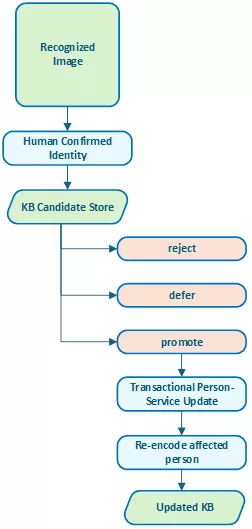
Figure 1: Recognition and KB promotion are now separate decisions. A confirmed identity becomes a candidate first, not an automatic reference image.
Why Automatic Learning Can Contaminate a Knowledge Base
Automatic learning is tempting. When the system recognizes an image and the user confirms the result, the image could be copied into the person’s reference folder immediately. On the next run, the system would have one more example to learn from.
This sounds efficient, but it can introduce a dangerous feedback loop. Imagine a borderline recognition result. The system suggests Person A. The human reviewer accepts the suggestion because the image looks plausible. The app then automatically adds that image to Person A’s reference gallery.
If the reviewer was wrong, the image is showing a lookalike or if the image mainly shows another person in a group photo, the KB has now been contaminated. Future recognitions may become more likely to repeat or amplify that mistake.
Even when the identity is correct, uncontrolled growth can still reduce gallery quality. The reference set can become too large and repetitive, or biased toward recent images, or dominated by close-up portraits and missing useful body variation, or simply polluted by low-quality or ambiguous files.
A KB should not simply collect examples. It should preserve a useful, compact and trustworthy reference set. That is why reviewed classification should not immediately alter recognition references.
The Candidate Store: A Waiting Room for Possible References
The first safeguard is the candidate store. After a human confirms an identity, we register the image as a knowledge-base candidate rather than copy it into the person’s KB folder immediately. The candidate is not yet trusted. It is simply a proposal.
A candidate record preserves basic information such as the person’s name, the source image path and the source image hash. We also the save the review session, in which we confirmed the image, with the machine-generated recognition evidence and the current lifecycle status.
{
  "candidate_id": "kb_cand_20260716_001",
  "person_name": "Person A",
  "source_path": "persons_processed/Review/image_002.jpg",
  "source_sha256": "6a4f...",
  "review_session_id": "review_20260716_143000",
  "status": "pending",
  "machine_record":
  {
    "disposition": "review",
    "contenders": [...]
  }
}The important idea is that candidate registration is append-only. The app records events rather than silently overwriting state. A candidate can move through successive statuses: pending, promoted, rejected, deferred, failed.
| State | Candidate Image |
| Pending | The candidate has been registered and is waiting for curation. |
| Promoted | The image has been accepted as a useful reference and copied into the person’s KB gallery. |
| Rejected | The image should not become part of the KB gallery. This does not mean the classification was wrong. It only means the image is not suitable as a trusted reference. |
| Deferred | The reviewer is not ready to decide. This is useful for ambiguous images, older photos, group shots or cases where the current KB itself may need inspection first. |
| Failed | The app attempted to apply a curation decision but could not complete it safely. For example, the source file may have disappeared or changed since it was registered. |
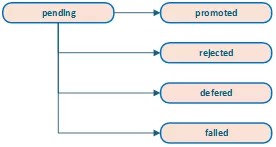
Figure 2: Candidate lifecycle. A candidate is a proposal, not yet part of the trusted KB gallery.
Protecting Candidates with SHA-256
A candidate points to a source image. That source image may remain outside the KB until we promote the candidate. This creates a simple but important integrity question: Is the file still the same file that was reviewed?
The app addresses this by storing a SHA-256 hash at candidate-registration time. Before promotion, we hash the source file again. If the hash no longer matches, the app should refuse to promote it automatically. That protects against situations such as: the source image was edited, the file was replaced or the path now points to a different image, synchronization software modified metadata or content or a user reorganized the source folder.
The hash check is a small detail, but it gives the curation workflow an important safety property. The user does not promote a file different from the one originally reviewed.
From Candidate Promotion to Gallery Optimization
Candidate promotion solves one problem: it prevents confirmed recognition results from immediately contaminating the KB.
But the latest version of the app goes even further. It also asks whether the existing KB gallery itself is still optimal. For each person, the app can now compare the current KB images with images in the person’s collection folder and the reviewed recognition candidates to propose an optimized gallery.
This is a different mindset. Instead of asking, which new images can I add, the app asks:
Which set of images best represents this person for future recognition? That means current KB images and possible new images should be evaluated together.
An existing KB image may remain valuable. It may also be blurry, redundant or weak compared with better images in the person’s collection. A collection image may be high quality but unsupported by the current trusted references. A reviewed candidate may be useful but not yet diverse enough to justify promotion.
The goal is not automatic replacement. The goal is to produce an informed proposal.
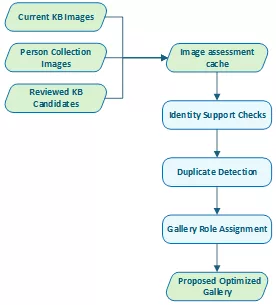
Figure 3: The optimizer evaluates current KB images and possible additions together before proposing a gallery.
Trusted References as Identity Anchors
The gallery optimizer starts from the current KB, but it does not blindly trust every image in it. A person’s KB folder may already contain images of mixed quality. In the worst case, it may even contain an incorrect or ambiguous image.
The optimizer therefore uses trusted KB references as identity anchors. A trusted anchor is an existing reference image that appears consistent with other references for the same person. It is not selected merely because it exists. It should have usable face or body evidence and should not behave like an obvious outlier.
Candidate collection images are then compared against these trusted anchors. This allows the app to ask whether a collection image resembles the trusted face references, whether its body embedding supports the same identity, and whether it is close enough to the person’s known reference cluster. Is the image close enough to the person’s known reference cluster? Or should it be sent to manual review?
A collection image that is not sufficiently supported by trusted KB references is not automatically added. It may still be the correct person, but the app treats it as requiring human judgement. This is especially important when person collection folders contain group photos, old photos, screenshots, cropped images or mixed media.
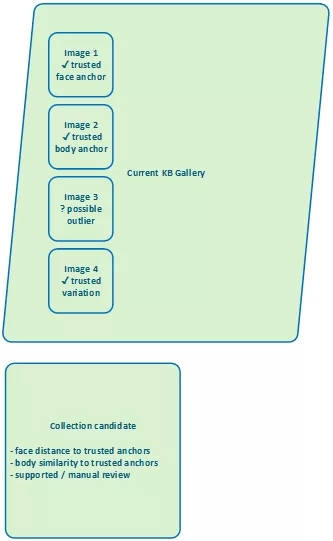
Figure 4: Collection images are compared against trusted KB references before they can be proposed for promotion.
Comparing Collection Images with Current KB Images
The earlier app could add images from a folder, but it did not truly compare those images with the existing KB gallery. The new optimizer evaluates both sides. For each image, it can consider signals such as whether a usable face embedding exists, whether an usable body embedding exists. What is the face quality, the body quality? Is the image
supported by trusted references or is maybe a near- or even a full duplicate? What is the current origin and suggested gallery role? What are the overall reasons for keeping, adding, reviewing or possibly removing the image.
This makes curation more transparent. Instead of saying: “added 5 images”, the optimizer can say something closer to: “Keep this image as a face anchor”. “Add this image as a body variation”. “Review this image because identity support is weak”. “Do not add this image because it is a duplicate”. “Consider removing this image because a sharper equivalent exists”.
That is much closer to how a human would curate a visual reference set.
{
      "person_name": "Person A",
      "path": "collection/person_a/photo_018.jpg",
      "origin": "collection",
      "action": "add",
      "role": "Body Variation",
      "default_apply": True,
      "reason": "Supported by trusted body references and adds clothing/pose variation."
},
{
    	"person_name": "Person A",
    	"path": "kb/person_a/photo_003.jpg",
    	"origin": "kb",
    	"action": "remove",
    	"role": "Manual Review",
    	"default_apply": False,
    	"reason": "Near-duplicate of a sharper current reference."
}Gallery Roles
A good recognition gallery is not just a pile of images. It is a balanced set of references.
The optimizer therefore assigns gallery roles.
Face Anchor
A face anchor is a strong facial reference. It should ideally show:
- – a clear face;
- – good sharpness;
- – good lighting;
- – a sufficiently large face;
- – strong support from other trusted references.
Face anchors are the most important references for facial identity.
Face Variation
A face variation covers a different appearance. This may include:
- – a different angle;
- – changed hair;
- – glasses;
- – facial hair;
- – expression;
- – age;
- – lighting conditions.
Face variation is useful because real photo collections rarely contain only clean passport-style portraits.
Body Anchor
A body anchor provides a good reference for appearance-based matching. It may show:
- – the upper body;
- – full body;
- – a stable silhouette;
- – useful clothing and pose information;
- – sufficient resolution for body embedding.
Body anchors help when the face is missing, small or not usable.
Body Variation
Body variation captures differences in appearance. This can include:
- – different clothing;
- – different seasons;
- – different camera angles;
- – standing versus seated posture;
- – indoor versus outdoor conditions.
Body variation is useful, but we must handle it carefully because clothing changes can also mislead a recognizer.
General Reference
Some images are useful but do not strongly specialize as face or body anchors. They may still provide additional support, especially for smaller galleries.
Manual Review
Manual Review is not a failure state. It means the image may be useful, but the optimizer does not have enough reliable evidence to promote it automatically.
Reasons may include:
- – no trusted KB face reference exists;
- – no trusted KB body reference exists;
- – the face distance is too large;
- – the body similarity is too low;
- – the image contains multiple faces;
- – the candidate is an identity outlier;
- – the image is a possible duplicate;
- – the current KB itself may be too weak.
Manual review keeps the optimizer conservative.
What the Optimizer Should Not Decide Alone
The optimizer should be conservative. It can propose additions, flag duplicates and explain why an image looks useful or suspicious. But it should not silently delete references, promote unsupported outliers or treat every high-quality image as a trusted identity anchor. The purpose of the optimizer is not to replace judgement, but to make the judgement easier and better informed.
Quality and Diversity Are Different Objectives
One of the key lessons from this work is that image quality and gallery quality are not the same thing. A sharp, well-lit portrait may be an excellent image. But 10 sharp, well-lit portraits from the same angle may be a poor gallery. A useful gallery needs quality, but it also needs diversity.
Quality answers: Is this image usable? Diversity answers: Does this image add something that the current gallery does not already cover? A simple ranking by image quality tends to over-select similar images. It prefers the cleanest portraits and may ignore useful variation.
A better gallery contains a small number of strong anchors plus carefully chosen variations. For example: 2 clear frontal face anchors + 2 face variations + 2 body anchors
2 body variations + 1 or 2 general references.
The exact numbers depend on the person and the size of the collection, but the principle is the same: the gallery should be representative, not merely large.
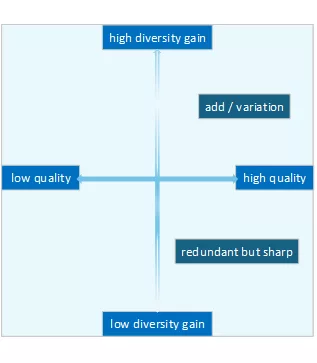
Figure 5: A sharp image is not automatically a valuable reference. The optimizer also considers whether it adds new coverage.
Why Removals Should Remain Opt-In
If the optimizer can detect redundant or weak images, it may be tempting to let it clean the KB automatically. That would be risky. Removing reference images changes future recognition behaviour. An image that appears redundant according to one metric may still be useful in a specific real-world situation.
For that reason, we treat proposed additions and proposed removals differently.
Additions can often be preselected when the evidence is strong. Removals should remain opt-in. A removal proposal is presented as advice: “This image appears redundant”. “The image is a lower-quality duplicate”. “This image is weaker than another available reference”. “This image may be an identity outlier”.
The user should then decide. This keeps the optimizer useful without turning it into an aggressive automatic cleaner.
Applying Approved Changes Once Per Person
After the user reviews the proposal, the app applies approved changes per person.
This is important. If five images are promoted for the same person, the app should not copy one image, re-encode the person, copy the next image, re-encode again, and repeat. Instead, it should group the approved changes.
Person A:
- add approved images;
- remove approved images;
- re-encode Person A once.
In code:
for person_name, changes in group_by_person(approved_changes).items():
    person_service.update_person_images(
        name=person_name,
        add_images=changes.additions,
        remove_images=changes.removals,
        on_progress=progress_handler,
        on_log=log_handler,
)That makes the operation faster and safer. It also produces a clearer audit trail. Person A updated: added: 4, removed: 1, re-encoded: once. The app treats the gallery update as one operation rather than a sequence of disconnected edits.
Transactional KB Updates
Updating the KB touches both files and embeddings. That means failure handling matters. A safe update should avoid ending up in a half-updated state where:
- – files were copied but encodings were not updated;
- – encodings were updated but files are missing;
- – removals succeeded but additions failed;
- – re-encoding failed after the folder had already changed.
The new workflow therefore applies approved changes through the new person service, which can treat updates transactionally. The intended behaviour is: prepare the changes, copy the additions, remove approved files, then re-encode the affected person and finally publish the updated encodings.
If something goes wrong, the app should report the failure and avoid silently leaving the KB in an inconsistent state. This matters because the KB is no longer just a folder of images. It is the foundation for all future recognition decisions.
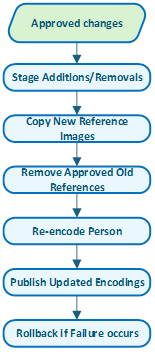
Figure 6: Approved gallery changes are applied once per person and published only after re-encoding succeeds.
Safe Active Learning
We see this design as a form of safe active learning. The recognizer proposes. The human confirms. The app records the candidate. The curator decides whether the image is useful as reference material. The gallery optimizer compares it against existing references. Only then can the KB change.
The full path is deliberately slower than automatic learning: machine evidence leads to a human identity decision, the human decision can create a candidate, curation decides whether that candidate is useful, and only transactional promotion triggers re-encoding.
That slowness is a feature. It prevents the KB from learning from every uncertain result and forces a second decision before the reference gallery changes.
From Growing the KB to Improving the KB
The previous article focused on what happens when recognition is uncertain. This article focuses on what happens after we resolve uncertainty. A confirmed identity is useful, but it is not automatically a trusted reference.
The application now treats the KB as something that should be curated, not merely enlarged. That changes the role of the app. It is no longer only a recognition tool. It is becoming a system for maintaining a high-quality personal reference gallery over time.
The workflow now distinguishes between images that can be classified and images that should be reviewed and images that can become KB candidates. Candidates that should be promoted and candidates that should be rejected or deferred. Current KB images that should be kept and current KB images that may be redundant or weak. That is a more realistic model for managing people in large photo collections.
The goal is not to make the knowledge base as large as possible. The goal is to make it trustworthy, compact and useful.
A summary of this article has been published on LinkedIn.
Ask a Question or give Feedback about this article