
Update
The approach described in this article is now outdated.
Nowadays, the Python package HdWCryptoData is available from PyPI and documented on GitHub. You can download and install it with:
python -m pip install hdw-crypto-data
The package downloads historical candlestick data from Binance Vision, supplements those archives with recent candles from the Binance REST API and then merges and loads the result as a cleaned, timezone-aware pandas DataFrame.
The same DataFrames could support: Technical-Analysis, Pattern recognition, Machine-learning experiments, Event studies, Volatility and correlation research, Data-quality monitoring and Custom notebooks and dashboards.
Read all about it in this post
Original Article
Whether you want to train a model or study the history of Bitcoin (BTC), Ethereum (ETH), Ripple (XRP) or other classical crypto assets, you need data, historical data and preferably as complete as possible. Binance offers a goldmine of historical cryptocurrencies data! Thus we get our historical bitcoin data from Binance!

Bitcoin has been around for quite some time and so has Ethereum and most other ‘classic’ altcoins. Meme coins, like Shiba Inu (SHIB) or Dogecoin (DOGE) on the other hand, are a lot more recent, they have often only been around for a few years. For most assets, you want the complete history or, if it goes back a long way, for example the data from the last 5 years.
The data we are talking about is a so-called time series, a collection of data points in which we record information per unit of time, such as a day, an hour or a minute. For financial assets, such as stock or crypto, it concerns price data: the opening, closing, high and low values for the relevant unit of time, plus the traded volume and the number of transactions per that unit of time.
You can find historical bitcoin data at many places on the internet. But if you really need a lot of crypto data, like the entire (klines) price history for Bitcoin per hour, or even per minute, you can best go to the largest collection in the world and that is, not coincidentally, at the largest crypto exchange in the world: Binance.
Binance Historical Data Library
Below we explain how you can best download the historical data you need from Binance and store it locally for later use. For this we gratefully use an existing Python library: binance_historical_data which is installed in your Python environment with the command “pip install binance_historical_data”. To make the most of your historical data collection we explain in a separate post how to combine it with the most current data to form a complete and up-to-data dataset.
Note: Starting 01-01-2025 Binance has changed it’s Unix timestamp from milliseconds into microseconds. If you are not prepared, this may cause your code to break. Both posts concerning adding current to historical data and pre-processing cryptocurrency data have been adjusted to accommodate this changes.
Multithreading and Multiprocessing
In this code we not only use multithreading but also multiprocessing. So to prevent freezing, crashing or other undesirable application behavior special measures are necessary. These we detail in a separate post.
The class that uses the library also makes use of the graphical Python add on PyQt but of course you don’t have to use it, the code can be used as a standalone script to get historical Bitcoin data from Binance, see below.
Note: Be aware that for symbol-pairs not listed on Binance (like SPX6900 with USDT) the API may return an empty list without any further notice. So we need to check to make sure we did in fact receive any data!
The script consists of two classes: the actual worker thread and a separate class that runs the worker.
Worker Thread
# Copyright (c) 2024, 2025 Hans De Weme
# Licensed under the MIT License (https://opensource.org/licenses/MIT).
# Class Bdumper
# Purpose: collecting historical data on crypto assets market, used in ticker combination with USDT (could also be USD, USDC, EUR, GBP)
# library documentation:
# https://github.com/stas-prokopiev/binance_historical_data
# https://data.binance.vision/?prefix=data/spot/
#
# Note: since 01-01-2025 Binance uses microseconds for it's timestamps instead of milliseconds!
#
from   multiprocessing import Process, freeze_support
from   data_dumper     import BinanceDataDumper
from   pathlib         import Path
from   PyQt6.QtCore    import QObject, pyqtSignal,  QThread     # use to integrate in PyQt GUI applications
import ssl                                                      # avoid SSL errors like: SSL: CERTIFICATE_VERIFY_FAILED]
ssl._create_default_https_context = ssl._create_unverified_context

# class init arguments:
# asset    - crypto asset to collect data from Binance
# settings - json object used as Python dictionary

class DumpWorker(QObject):
    finished = pyqtSignal(str)

    def __init__(self, markt, dir):
        super().__init__()
        self.markt = markt
        self.dir = dir
        freeze_support()  # needed for Windows

    def run(self):
        print("🔧 DumpWorker started")
        try:
            dumper = BinanceDataDumper(
                path_dir_where_to_dump=self.dir,
                asset_class="spot",
                data_type="klines",
                data_frequency="1h"
            )
            dumper.dump_data(
                tickers=[self.markt],
                date_start=None,
                date_end=None,
                is_to_update_existing=True,
                tickers_to_exclude=["UST"]
            )
            dumper.delete_outdated_daily_results()
            print("✅ DumpWorker finished successfully")
        except Exception as e:
            print(f"❌ DumpWorker error: {e}")
        self.finished.emit(self.markt)
Class that runs the Worker Thread
class Bdumper(QObject):
    dump_successful = pyqtSignal(str)

    def __init__(self, asset, settings):
        super().__init__()
        pad = Path(settings['spot'])
        dir = str(pad.parent.resolve()) + '\\'
        self.base_dir = str(pad.parent.resolve()) + '\\'

        self.markt = str(asset.upper()) + 'USDT'
        print(f"📥 Start Bdumper with: {self.markt}")
        print(f"📂 Dumping to: {dir}\\spot")

        self.thread = QThread()
        self.worker = DumpWorker(self.markt, dir)
        self.worker.moveToThread(self.thread)

        # Connect signals
        self.thread.started.connect(self.worker.run)
        self.worker.finished.connect(self.on_finished)
        self.worker.finished.connect(self.thread.quit)
        self.worker.finished.connect(self.worker.deleteLater)
        self.thread.finished.connect(self.thread.deleteLater)

        self.thread.start()

    def on_finished(self, markt):
        print(f"📤 Dump finished for: {markt}")
        # Binance may return an empty list for a symbol-pair not listed on Binance, so checked if we did recieve anything!
        days = self.base_dir+"\\spot\\daily\\klines\\"+self.markt+"\\1h"
        days_path = Path(days)
        if days_path.is_dir():
            self.dump_successful.emit(markt)
        else:
            print('Path : '+str(days)+ ' not found! No Historical Data Recieved')
QMessageBox.information(None, '* * * NO HISTORICAL DATA RECIEVED! * * *', f"This Symbol Pair probably not listed on Binance: '{self.markt.upper()}?!", )Run It Stand-alone
Add this special main method at the bottom of the script to run it conveniently from the command line without the need to load a GUI.
# run this script stand alone
if __name__ == "__main__":
    import sys
    import json
    from PyQt6.QtWidgets import QApplication

    app = QApplication(sys.argv)
    settings_path = "settings.json"
    with open(settings_path, 'r') as f:
        settings = json.load(f)

    asset = 'SHIB'                              # Change this to the symbol name of an asset listed on Binance
    bdumper = Bdumper(asset, settings)

    def quit_app_when_done(markt):
        print(f"✅ Done dumping data for: {markt}")
        app.quit()

    bdumper.dump_successful.connect(quit_app_when_done)

    sys.exit(app.exec())  # Starts Qt event loop and handles thread lifecycle
Bdumper Class Overview
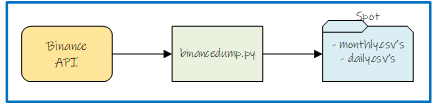
We designed the Bdumper class to facilitate the collection of historical cryptocurrency market data from Binance. So if you need to get historical Bitcoin data from Binance look no further, this is the one you want! This class is hardcoded for working with crypto assets in combination with USDT, but you can add other currency pairs like USD, USDC, EUR, or GBP easily. The class integrates seamlessly with PyQt6 applications and advantages multithreading to perform data collection efficiently.
Purpose
The primary purpose of the Bdumper class is to:
- Collect historical market data for a specific cryptocurrency.
- Store the data in a structured directory for easy access and further processing.
- Provide integration with PyQt6 for use in GUI applications.
Prerequisites
Install the required libraries: binance_historical_data: For downloading historical data and PyQt6: For GUI integration.
Ensure compatibility with the Binance Historical Data library and access the official documentation: Binance Historical Data GitHub
A JSON-based settings file with a ‘spot’ key: the directory path where data is stored.
Features
- Signal Emission: Emits a PyQt signal (dump_successful) upon successful data collection.
- Multithreading: Uses a worker thread to download data without blocking the main application thread.
- Flexible Data Handling:
- Dumps data into a directory structure (e.g., ..\spot).
- Automatically deletes outdated daily results once replaced by monthly data.
Initialization
Constructor
Bdumper (asset: str, settings: dict)
- Parameters:
- asset (str): The cryptocurrency asset to collect data for (e.g., “BTC”).
- settings (dict): A JSON object (Python dictionary) with a spot key defining the base directory path for storing collected data.
- Example Settings JSON:
- {
“spot”: “../data”
}
Workflow
Step-by-Step Execution
Initialization: The selected asset (e.g., “BTC”) is combined with “USDT” to form the ticker (e.g., “BTCUSDT”).
Multithreading: A separate thread is started to perform data collection, allowing the main application to remain responsive.
- Data Collection: The Binance Historical Data library (BinanceDataDumper) is used to fetch hourly Kline (candlestick) data for the specified ticker.Data is stored in the directory: <base_dir ectory>/spot.
- Completion: Once the data collection is complete, we emit a signal (dump_successful) with the ticker name.
Methods
__init__: Constructor
Initializes the class, sets up the directory path, and starts the worker thread for data collection.
- Key Functionalities:
- Resolves the target directory for data storage.
- Starts the worker thread.
thread_function: Worker Thread
Handles the data collection process in a separate thread.
- Parameters:
- markt (str): The cryptocurrency ticker (e.g., “BTCUSDT”).
- dir (str): The resolved base directory path.
- Key Functionalities:
- Initializes BinanceDataDumper with required settings.
- Dumps Kline data for the selected ticker.
- Deletes outdated daily results if replaced by monthly data.
Signals
dump_successful
- Emitted when the data dump is complete.
- Parameters:
- markt (str): The ticker of the cryptocurrency for which data was successfully dumped.
Dependencies
- External Libraries:
- binance_historical_data
- PyQt6
- Standard Libraries:
- threading
- multiprocessing
- pathlib
Example Usage
PyQt Integration
from PyQt6.QtCore import QCoreApplication
import sys
if __name__ == “__main__”:
app = QCoreApplication(sys.argv)
settings = {“spot”: “../data”} # Settings dictionary
dumper = Bdumper(“BTC”, settings) # Settings dictionary
dumper.dump_successful.connect(lambda market: print(f”Data collection complete for: {market}”))
sys.exit(app.exec())
Command-Line Execution
if __name__ == “__main__”:
settings = {“spot”: “../data”}
dumper = Bdumper(“BTC”, settings)
Directory Structure
The following structure is created for data storage:
<base_directory>
└── spot
└── <ticker_files>
Example:

Logs
The class prints logs to the console for:
- Initialization details (market and directory).
- Worker thread start and completion status.
- Data collection progress.
Error Handling
- Ensure valid directory paths in the settings dictionary.
- Handle library-specific errors during data download (e.g., network issues, invalid tickers).