
Update
The approach described in this article is now outdated.
Nowadays, the Python package HdWCryptoData is available from PyPI and documented on GitHub. You can download and install it with:
python -m pip install hdw-crypto-data
The package downloads historical candlestick data from Binance Vision, supplements those archives with recent candles from the Binance REST API and then merges and loads the result as a cleaned, timezone-aware pandas DataFrame.
The same DataFrames could support: Technical-Analysis, Pattern recognition, Machine-learning experiments, Event studies, Volatility and correlation research, Data-quality monitoring and Custom notebooks and dashboards.
Read all about it in this post
Original Article
Preprocessing Data From CSV to Pandas Dataframe
This Python class is special in that it is not intended to be run as a standalone script but rather as a preparatory part of other modules that want to independently process a ready-made CSV file with the time series data of cryptocurrency like Bitcoin (BTC) or a stock ticker like NVIDEA (NVDA) but need to perform a number of similar checks and operations before doing so. If similar code needs to be executed more often, it is not useful to keep adding that code to new modules; it is much better to capture that functionality in a separate module that can be called from any script that needs this functionality. Although the class is tailormade to be used with a data gathering module like the one described in this post, the code is all-round and widely applicable. If you would like to add other functionality, here are some suggestions.
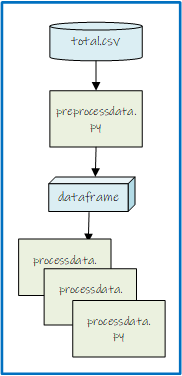
The Preprocess class used for preprocessing data checks if the data is available, up-to-date (and if not offers to add the latest price information), indexes it and offers the possibility to strip fields not needed for the intended use. The class integrates with PyQt GUI applications but can easily be used in a command line environment as well.
The Preprocess Class
Things start with loading the needed libraries for data handling: pandas and numpy and several utilities. For user interaction this class uses the PyQt6 GUI Framework. After loading the global settings, the method get_ready_data_file() is called to verify whether the needed data is present.
# Copyright (c) 2024 Hans De Weme
# Licensed under the MIT License (https://opensource.org/licenses/MIT).
# Class PreProcess
# Purpose: check if an up-to-date csv.file for a crypto or stock asset is available, if more select one, check is stock or crypto,
# which data fields can/must be stripped (TA needs all open, high, low, close, volume, #trades <> model training only needs closing price!)
# perform data cleaning and indexing (replace Unix with regular hourly datatime index)
from datetime import datetime, timedelta
import os
import time
import pandas as pd
import numpy as np
from   PyQt6.QtCore    import QObject                                       # for use in  PyQt GUI Application
from   PyQt6.QtWidgets import QInputDialog, QMessageBox, QFileDialog
from   time_handle import handleTime
import warnings
warnings.filterwarnings("ignore")

# class init arguments:
# called_from    - target for processing, determines if stripping of fileds is neccesary
# settings       - json object used as Python dictionary

class PreProcess(QObject):
    def __init__(self, called_from, settings):
        super().__init__()                                                  # necessary for QObject, needed for pyqtSignal
        self.caller   = called_from
        self.settings = settings
        self.positive = False
        self.markt    = self.get_ready_data_file()                          # needed for time-zone converion
        self.time_handle = handleTime('settings.json')
        if self.positive == False:
            QMessageBox.information(None, '* * * DATA PROBLEM * * *', "No Data File to Process!")

        # check if exactly one 'MARKT'-totaal.csv is ready to be processed (created by GetActualMakeTotal.py)
    def get_ready_data_file(self):
        res = None
        current_dir = self.settings['home']
        files_in_cwd = [file for file in os.listdir(current_dir) if file.endswith('-totaal.csv')]
        if not files_in_cwd:
            print('\n* * * NO DATA FILE TO PROCESS  * * *')
        elif len(files_in_cwd) > 1:
            print('\n* * * TOO MANY DATA FILES TO PROCESS  * * *')
            # Open a file dialog and get the selected file path
            file_path, _ = QFileDialog.getOpenFileName(None, "Select a Preprocessed Total File", "","CSV Files(*-totaal.csv)")
            if file_path:
                res = os.path.basename(file_path).split('-')[0]
                self.positive = True
            else:
                print("No file selected")
        else:
            pad = os.path.join(os.getcwd(), files_in_cwd[0])
            res = os.path.basename(pad).split('-')[0]
            self.positive = True
        return res
Processing
Several aspects of the datafile are probed: number of columns, when it is last changed, whether it contains crypto or stock data, which columns can be dropped, whether data is missing, whether or not the latest price info should be added by the user. If the datafile contains stock ticker data (from Yahoo Finance) the index can safely be converted to a pandas datetime index.
    # get the raw dataset as csv (created by: binancedump.py, getactualmaketotal.py or getstockdata.py)
    # add column headers, add new date column for index using the unix timestamp, delete colomns not needed
    # check if current hourly value is missing, offer to add it manually
    # remove NaN's and duplicates, set index, sort and check for missing data and show info and data first & last rows
    def get_num_columns_basic(self, file_path):
        with open(file_path, 'r') as file:
            header = file.readline().strip()  # Read first line and strip newlines
            columns = header.split(',')  # Adjust the delimiter if needed (e.g., split(';'))
        return len(columns)

    def is_file_recent(self, file_path):
        file_mod_time = os.path.getmtime(file_path)
        current_time = time.time()
        time_diff_hours = (current_time - file_mod_time) / 3600
        # Return True if the file was modified within the last 2 hours, False otherwise
        return time_diff_hours <= 2

    def process_data_file(self, mrkt, strip):
        columns = ['open_time', 'open', 'high', 'low', 'close', 'volume', 'close_time', 'quote_asset_volume', 'number_of_trades', 'taker_buy_base_asset_volume', 'taker_buy_quote_asset_volume', 'ignore']
        file_path = mrkt+"-totaal.csv"
        if self.is_file_recent(file_path) == False:
            result = QMessageBox.question(None, "* * * File is NOT Recent * * *", "The file was modified more than 2 hours ago. Do you want to proceed?",
                                              QMessageBox.StandardButton.Yes | QMessageBox.StandardButton.No, QMessageBox.StandardButton.No)
            if result == QMessageBox.StandardButton.No:
                return None
        print('\n* * * SPOT MARKET TO PROCESS: {} * * *'.format(mrkt))
        stock_cols = 8
        if 'stock_columns' in self.settings:
            value = self.settings['stock_columns']
            if isinstance(value, int):
                stock_cols = value
        num = self.get_num_columns_basic(file_path)
        if(num < stock_cols):  # the asset is stock
            df = pd.read_csv(file_path, index_col=0, parse_dates=True)
            df.index = pd.to_datetime(df.index, utc=True)
            df.index = df.index.tz_convert(None)
            if strip:        # strip: only close-price needed to train  SARIMAX or LSTM models with
                df.drop(['open', 'high', 'low', 'volume', 'number_of_trades'], axis = 'columns', inplace = True)
        else:
Converting a Unix Timestamp to a Pandas datetime Index
If the datafile contains cryptocurrency data we first check whether it already contains header information. If not we add the column names and after that we read in the first timestamp (‘first_ts’).
        else:
            # Peek first line manually
            with open(file_path, 'r') as f:
                first_line = f.readline()
            if 'open_time' in first_line:
                df = pd.read_csv(file_path)
            else:
                df = pd.read_csv(file_path, header=None, names=columns)
            first_ts = df['open_time'].iloc[0]
            detected_unit = self.detect_time_unit_and_convert(first_ts)
            print(f"Detected time unit: {detected_unit}")
            df['dt'] = pd.to_datetime(df['open_time'], unit=detected_unit, origin='unix')
            df['dt'] = df['dt'].dt.tz_localize('UTC')  # <- this line is critical for time-zone converion
To find out the unit we test it in a separate method, see below, using the result we can safely use pd.to_datetime(df[‘open_time’], unit=detected_unit, origin=’unix’).
    # Detect whether timestamp is in ms or us so we can convert accordingly.
    def detect_time_unit_and_convert(self, ts):
        now = pd.Timestamp.now()
        tolerance_days_future = 30  # Allow small future drift
        earliest_allowed = pd.Timestamp('2009-01-01')  # Bitcoin genesis
        latest_allowed = now + pd.Timedelta(days=tolerance_days_future)
        # Try as milliseconds
        try:
            ts_ms = pd.to_datetime(ts, unit='ms', origin='unix')
        except Exception:
            ts_ms = None
        # Try as microseconds
        try:
            ts_us = pd.to_datetime(ts, unit='us', origin='unix')
        except Exception:
            ts_us = None
        # Validate ms
        if ts_ms is not None and earliest_allowed <= ts_ms <= latest_allowed:
            return 'ms'
        # Validate us
        if ts_us is not None and earliest_allowed <= ts_us <= latest_allowed:
            return 'us'
        raise ValueError(f"Cannot detect proper time unit for timestamp: {ts}")
Now we can proceed with dropping columns we don’t need and asking the users whether they want to provide the very latest price info manually.
We then enforce the index and fill in any missing data. Finally we print some information on the dataset.
            if strip:        # strip: only close-price needed to train  SARIMAX or LSTM models with
                df.drop(['open_time', 'open', 'high', 'low', 'volume', 'close_time', 'quote_asset_volume', 'number_of_trades','taker_buy_base_asset_volume', 'taker_buy_quote_asset_volume','ignore'], axis = 'columns', inplace = True)
            else:            # keep other columns for technical analyses
                df.drop(['open_time', 'close_time', 'quote_asset_volume', 'taker_buy_base_asset_volume', 'taker_buy_quote_asset_volume','ignore'], axis = 'columns', inplace = True)
            # check for latency
            dt    = df.loc[len(df.index)-1,'dt']
            value = df.loc[len(df.index)-1,'close']
            # set index
            df=df[~np.isnan(df)]
            df=df.drop_duplicates()
            df.set_index('dt', inplace=True)
            df = df.sort_index()
            df = self.time_handle.convert_dataframe_timezone(df, self.time_handle.tzone, original_tz='UTC')  # convert

            # reindex with full hourly range and check for missing hours
            full_range = pd.date_range(start=df.index.min(), end=df.index.max(), freq='H')
            df_full = df.reindex(full_range)
            missing_times = df_full[df_full.isnull().any(axis=1)].index
            if len(missing_times) > 3:
                print(f"\n* * * MISSING DATA AT: {missing_times}")
                datetime_series = pd.Series(missing_times)
                datetime_series.to_csv(mrkt+'_missingdata.csv')
                aantal = len(missing_times)
                print('Aantal: '+str(aantal))
                print('* * * Datetimes for missing values saved in csv file * * * ')
                df['close'] = df['close'].interpolate(method='spline', order=3)
                print('* * * Missing values filled in with spline order 3 * * * ')
            else:
                print("\n* * * No missing data detected. * * *")
        print(df.info())
        print(df.tail(5))
        return df
PreProcess Class Overview
The PreProcess class is designed to handle preprocessing of financial data for cryptocurrency or stock assets. It ensures that the data is up-to-date, cleans and indexes it appropriately, and provides options for fieldstripping based on the intended use (e.g., training machine learning models or technical analysis). The class integrates seamlessly with PyQt6 GUI applications.
Purpose
The PreProcess class:
- Checks for the availability of up-to-date CSV files for an asset.
- Identifies whether the asset is a stock or cryptocurrency based on the number of data columns.
- Strips unnecessary fields if required (e.g., retaining only the closing price for model training).
- Cleans the data by:
- Adding headers and indexing.
- Replacing Unix timestamps with regular hourly datetime indices.
- Handling missing or duplicate data.
- Interpolating missing values if necessary.
Prerequisites
- Dependencies:
- Libraries: datetime, os, time, pandas, numpy, PyQt6, warnings
- Install dependencies via pip install if not already available.
- Settings File:
- A JSON object or Python dictionary must include:
- home: Directory containing the data files.
- stock_columns: Number of columns for stock data (optional; default is 8).
- Example settings:
- A JSON object or Python dictionary must include:
{
“home”: “../data”,
“stock_columns”: 8
}
Features
- Automatic File Selection: Ensures only one up-to-date CSV file is selected for processing, allowing manual selection if multiple files are found.
- Dynamic Field Stripping: Retains only the necessary fields based on the caller’s requirements (e.g., technical analysis vs. model training).
- Error Handling: Notifies the user if no suitable data file is available or if the file is outdated.
- Data Validation and Cleanup:
- Removes duplicates and fills missing values using spline interpolation.
- Reindexes data to ensure a consistent hourly datetime index.
- Checks for missing hourly data and logs missing timestamps.
Initialization
Constructor
PreProcess(called_from: str, settings: dict)
- Parameters:
- called_from (str): The context in which the class is used (e.g., technical analysis or model training). Determines whether field stripping is necessary.
- settings (dict): A JSON object or Python dictionary containing configuration settings.
Workflow
Step 1: File Availability Check
- The get_ready_data_file method:
- Ensures exactly one *-totaal.csv file is available in the specified directory.
- If multiple files exist, prompts the user to select one using a file dialog.
Step 2: Data Processing
- The process_data_file method:
- Validates the file’s recency (modified within the last 2 hours).
- Reads the CSV file and applies appropriate field stripping.
- Converts Unix timestamps to regular datetime indices.
- Identifies and fills missing values, saving missing timestamps to a separate CSV file if necessary.
Methods
1. get_ready_data_file
get_ready_data_file() -> str
- Ensures that exactly one *-totaal.csv file is ready for processing.
- Returns: The base name of the selected asset (e.g., “BTC”).
2. is_file_recent
is_file_recent(file_path: str) -> bool
- Checks if the file was modified within the last 2 hours.
- Parameters:
- file_path: The path to the data file.
- Returns: True if the file is recent; False otherwise.
3. process_data_file
process_data_file(mrkt: str, strip: bool) -> pd.DataFrame
- Handles the entire data preprocessing workflow.
- Parameters:
- mrkt (str): The base name of the asset to process (e.g., “BTC”).
- strip (bool): Whether to retain only the closing price.
- Returns: A cleaned and processed pandas.DataFrame.
Signals
The class does not emit PyQt signals but integrates with PyQt6 for GUI interactions.
Logs
The class logs details for:
- File availability and selection.
- Data processing steps, including cleaning, indexing, and handling missing values.
- Missing timestamps, if any, saved to a separate CSV file.
Error Handling
- Notifies the user via a message box if:
- No suitable data file is available.
- The selected file is outdated and requires confirmation to proceed.
Example Usage
1. PyQt Integration
from PyQt6.QtCore import QCoreApplication
import sys
if __name__ == “__main__”:
app = QCoreApplication(sys.argv)
settings = {“home”: “../data”, “stock_columns”: 8}
preprocessor = PreProcess(“technical_analysis”, settings)
if preprocessor.positive:
df = preprocessor.process_data_file(preprocessor.markt, strip=False)
print(df.head())
sys.exit(app.exec())
2. Command-Line Execution
if __name__ == “__main__”:
settings = {“home”: “../data”, “stock_columns”: 8}
preprocessor = PreProcess(“model_training”, settings)
if preprocessor.positive:
df = preprocessor.process_data_file(preprocessor.markt, strip=True)
print(df.head())
Limitations
- Assumes consistent file naming conventions (*-totaal.csv).
- Limited to handling hourly data intervals.
- Relies on user input for missing current hourly data.
Future Enhancements
- Automate interpolation for missing hourly data without user input.
- Add support for multiple time intervals (e.g., daily, weekly).
- Enhance error handling for malformed or incomplete CSV files.