
In the original ChronoName article, I described a deterministic workflow for renaming photo and video files by capture time.
The idea was simple. Filenames such as IMG_4821.jpg, DSC01234.ARW, or VID_20240118_173839.mp4 are not very useful once photos from several phones, cameras, and messaging apps are mixed together.
A timestamp-based filename is much more durable. Take for instance 20240118_173839.jpg, 20240118_173839_234.jpg or 20240118_173839__SONY-A7M3.arw. Files named this way sort chronologically in almost any file browser, backup tool, archive, or operating system. That was the core idea behind the original ChronoName script.
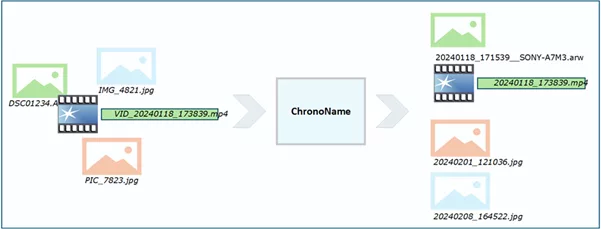
Since then, the workflow has grown into a local Windows desktop application with a PyQt interface. The naming principle has not changed. What has changed considerably is everything around it.
The main goal became not simply to automate renaming, but to make that automation inspectable, deterministic and reversible.
Why Move from Script to App?
The first version was useful, but it was still a script. That meant it worked best for someone comfortable with the command line and already willing to reason carefully about folders, metadata, dry runs, and undo logs.
The new ChronoName app keeps the deterministic naming logic, but now wraps it in a desktop GUI with a guided workflow.
First, you choose a source folder with media files and audit the timestamp health of these files. Optionally, you can generate CSV and HTML reports with thumbnail previews of exact or near-duplicate images. If the duplicate report looks right, selected duplicates can be quarantined in a special subfolder instead of deleting them immediately.
Next, ChronoName builds a rename plan. You review the proposed changes and only then process that exact plan. That last distinction became increasingly important during development.
ChronoName is not designed to silently ‘fix’ a photo library. It is designed to show what it intends to do before it touches filenames. The workflow has therefore gradually become:

After renaming, an optional filing audit can use the newly standardized filenames to identify media that appears to have been stored under the wrong year or outside the date range represented by a dated folder.
The Safety Model : Separate Analysis from Mutation
A useful design principle emerged while building the desktop version: analysis and filesystem mutation should be separate operations.
Timestamp auditing, duplicate analysis, WhatsApp classification and rename planning inspect the collection and produce decisions or reports. They do not need to modify the source archive.
The actions that actually change files are explicit subsequent steps. When preparing media from a WhatsApp Sent folder, ChronoName can copy selected files into staging folders. Duplicate quarantine moves selected duplicate files into a local .quarantine folder. Processing a rename plan changes filenames only after that plan has been generated and reviewed.
This separation makes the application deliberately conservative. A tool working on a personal photo archive should make it easy to inspect a decision and comparatively difficult to make an irreversible mistake.
The Reviewed Plan Is the Operation
One of the more subtle hardening changes concerned what happens between planning and execution.
Originally, as in many batch-renaming tools, it was tempting to treat the plan as a preview and let execution resolve any new filename collision it encountered. If 20240118_173839.jpg suddenly existed, the execution code could simply find another available filename.
That sounds convenient, but it breaks an important promise: the operation the user reviewed is no longer necessarily the operation being executed.
ChronoName now treats the reviewed rename plan as authoritative. If a planned destination is no longer available when execution begins, the application reports a conflict instead of silently inventing a different filename.
The same principle applies to source files. A plan is only trustworthy while the files it describes remain the same. Relevant source state is therefore captured during planning and validated again before execution.
If a source file has changed after the plan was reviewed, the operation for that file is considered stale and is refused. The user can then generate a new plan based on the current state of the collection. This makes the workflow more transactional:
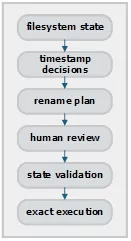
Execution does not reinterpret the plan.
Renames Are Journaled as They Happen
Undo logging during testing also turned out to have a less obvious failure mode.
Writing an undo file after a rename operation finishes works perfectly—until the application is interrupted halfway through a large operation. Imagine that 800 files have already been renamed when the process crashes. If the undo information is only written after the entire run completes, the filesystem has changed but the complete recovery record may never have been created.
ChronoName therefore journals successful mutations incrementally. As rename operations complete, their state is recorded so that recovery information exists for changes that have already happened even if the complete run does not finish normally.
A normal rename run still produces its convenient undo information, but recovery no longer depends entirely on reaching the final line of the operation.
Undo itself is deliberately strict as well. Suppose: IMG_4821.jpg was renamed to: 20240118_173839.jpg and someone subsequently created another IMG_4821.jpg. An undo operation should not restore the renamed file as: IMG_4821_001.jpg and claim that the original state has been restored.
ChronoName instead reports an undo conflict. For an archive tool, reversible should mean restoring the original state, not approximating it.
Timestamp Health Comes First
A major improvement in the desktop application is the timestamp health audit. Real-world media collections are messy.
Some files have reliable EXIF DateTimeOriginal values. Videos may store creation timestamps differently. Some images only have useful dates embedded in their filenames. Filesystem modification dates may describe when a file was copied or downloaded rather than when the photograph was taken.
ChronoName therefore audits the available timestamp sources before renaming. The audit reports which timestamp should be selected and whether that decision has high, medium, low or unknown confidence. It can also surface conflicts between embedded metadata, filename-derived dates and filesystem dates.
Files that should be reviewed manually are reported, as are files that already appear to follow the ChronoName naming convention.
An important hardening step was making sure that the audit and rename planner do not independently reason about timestamps. They use the same timestamp-selection logic. Conceptually, ChronoName arrives at a timestamp decision containing information such as: selected timestamp, source, confidence, warnings and rejected alternatives.
The audit explains that decision. The rename planner acts on the same decision. A timestamp considered suspicious during auditing should not quietly become acceptable simply because the rename planner happened to follow another code path.
This turns timestamp selection from a hidden implementation detail into something that can be inspected before filenames are changed.
What if the Library Changes Between Planning and Execution?
There is another consequence of separating planning from execution. A dry-run plan may be perfectly correct when it is created but become incorrect five minutes later. A file could be replaced, edited or moved. Another process could create one of the proposed destination filenames. A synchronization program could modify the collection in the background.
ChronoName therefore performs stale-plan validation. Relevant source state, including information such as path, size and modification time, is captured when the plan is built. Before executing a planned rename, that state is checked again. If the file no longer matches the state on which the reviewed decision was based, ChronoName does not assume that the old decision is still valid.
The affected operation is rejected and can be replanned. This is intentionally conservative. A reviewed plan should describe the files that are actually being modified.
Auditing Where ChronoNamed Files Are Filed
Once filenames reliably encode capture time, that information becomes useful for more than sorting.
My own photo archive is largely organized into year folders and dated event folders. That created another useful validation question. If the filename says when a photo was taken, is the file actually stored in a folder consistent with that date?
I already had a small standalone Python script for checking this after running ChronoName. That functionality has now been integrated into the application as the Tools menu item Audit Filing by Filename Date.
The audit remains deliberately report-only. It recursively examines ChronoNamed media files and compares the date encoded in each filename with the date implied by its filing location.
For example:
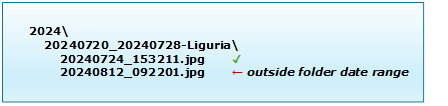
ChronoName recognizes both individual dated folders and date ranges. When a file is inside a dated folder, the nearest dated ancestor provides the constraint. The report therefore does not merely say that something is in the “wrong year”; it can explain that the file date falls outside the date range encoded in the folder name.
Four-digit year folders provide another level of validation:

The audit does not, however, require a year-based archive structure. If the selected root is not itself a year folder, ChronoName still discovers recognizable dated folders beneath it:

Files without either a dated ancestor or an applicable year constraint are simply left alone; the audit does not invent a filing rule where none exists.
Media files that do not follow the ChronoName filename format are reported neutrally as NotChronoNameFormatted. The audit intentionally does not fall back to EXIF or filesystem dates for those files, because that would turn it into another timestamp-health audit.
Tolerances & Reporting
This feature asks a narrower question: is the archive location consistent with the date already encoded in the filename? Small tolerances can be configured for date boundaries and for event folders that cross into the following year—for example a New Year’s trip beginning in December and ending in January.
The results are written to the existing ChronoName Reports folder. No files are moved or renamed.
One Source of Truth for ChronoName Filenames
Integrating the filing audit also exposed a smaller version of an architectural issue I had already encountered with DedupTool. For the details see the next paragraph.
The old standalone audit script had its own regular expression for understanding ChronoName filenames. That worked, but it meant there were now two definitions of what constituted a valid ChronoName filename. Instead of bringing that duplicate logic into the application, filename parsing was centralized. The rename workflow and filing audit now use the same parse_chrononame_filename() implementation.
This is a small change, but an important principle: If two parts of an application depend on the same rule, they should not maintain separate interpretations of that rule.
If the ChronoName filename format evolves later, there is now one parser to change rather than several implementations that can quietly drift apart.
DedupTool Is Now a Shared Engine
ChronoName also includes duplicate analysis because renaming and deduplication often happen together. Before normalizing filenames, it is useful to know whether the source collection contains exact or near-duplicate images.
The original ChronoName script incorporated duplicate-detection code derived from my separate DedupTool project. During testing, however, this exposed an architectural problem. DedupTool, ChronoName and the Person Recognition App had gradually acquired related copies of the same duplicate-detection implementation. That becomes dangerous as soon as one implementation changes and the others do not.
Testing ChronoName actually exposed a real example. The technical details are interesting, but not particularly relevant here. More important was what the bug revealed about the architecture: fixing it independently in three projects would leave three implementations that could drift apart again.
Instead, I changed the architecture. DedupTool is now organized as a reusable Python package. ChronoName and the Person Recognition App use that package rather than maintaining their own copies of the duplicate-detection logic. Matching, clustering, keeper selection, reporting and quarantine therefore have a single source of truth.
A matching-policy fix in DedupTool now automatically applies to all applications using it.
Duplicate Reports Remain Human-in-the-Loop
Even with stricter matching, duplicate detection remains deliberately conservative. ChronoName can generate CSV and HTML reports before anything is moved. The HTML report provides thumbnail previews so that duplicate clusters can be inspected visually.
If the result looks right, non-keeper files can be moved into a local .quarantine directory rather than deleted.
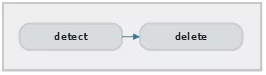
Quarantine preserves the relative source structure where possible, which also helps when files in different directories happen to have identical filenames. The duplicate workflow therefore follows the same philosophy as renaming:

rather than:
Better Handling for WhatsApp Media
WhatsApp images are a special case. They often have stripped metadata, inconsistent filenames and reduced image quality. Treating them exactly like normal camera files therefore produces poor archival decisions.
For this reason ChronoName includes a separate WhatsApp workflow. Sent images can be classified into categories such as likely gallery attachments, probable lower-quality duplicates of images already present in the photo collection, likely in-app camera images taken through WhatsApp and therefore potentially missing from the main collection, and a remaining category of unclassified or cropped images.
Received images are treated separately. They are often unique to the archive but may only have weak date information.
The application can create a WhatsApp import plan before renaming anything, making it easier to decide which images are worth keeping, matching against existing originals or importing into the main archive.
Again, planning comes before mutation.
Still Local, Still Deterministic
ChronoName remains a local tool.
It uses ExifTool for metadata extraction and does not require uploading a photo collection anywhere. The default filename format remains:
YYYYMMDD_HHMMSS[_milliseconds][__DEVICE][_counter].ext
The counter is only added when needed to avoid collisions. Optional device information can be included, when useful.
The original deterministic principle also remains: The same relevant file metadata should lead to the same proposed filename. But the new desktop application extends that principle further. Determinism now applies to execution as well as naming.
Once a plan has been reviewed, execution is not allowed to silently diverge from it. If the filesystem has changed in a way that invalidates the plan, ChronoName reports the conflict instead of improvising another result.
Running the App
The desktop application can be started from the installation folder with: py -3 main.py
The legacy command-line interface remains available:
py -3 chrononame.py D:\Photos\2024 –dry-run –name-tz Europe/Amsterdam –skip-already
and, after reviewing the result:
py -3 chrononame.py D:\Photos\2024 –name-tz Europe/Amsterdam –skip-already
ChronoName uses ExifTool for metadata extraction. For convenience, ExifTool is included with the ChronoName source package. The executable should remain in the ChronoName folder together with its exiftool_files subfolder.
The Python dependencies are listed in the file requirements.txt. These can be installed with: py -3 -m pip install -r requirements.txt
The desktop interface uses PyQt6, while the media-processing and duplicate-analysis components use the relevant Pillow, NumPy and optional HEIC-support dependencies.
Why This Is an Improvement
The original script solved the core naming problem. Given the available metadata, what should this media file be called?
Building the desktop application made it increasingly clear that this is not actually the hardest problem in a real photo archive. The harder questions are: Which timestamp should I trust? Why was that timestamp selected? Has the file changed since I reviewed the decision? What happens if the destination now exists? Can an interrupted operation be recovered? Does undo really restore the original state? Are these two files actually duplicates? Which duplicate should be retained?
Those questions gradually changed ChronoName from a batch-renaming script into a small archive workflow.
The resulting process is now closer to:
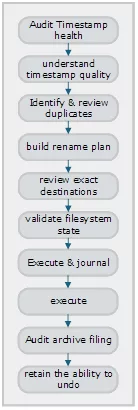
The underlying naming rule is still simple. What has become more sophisticated is the machinery that decides when it is safe to apply it. ChronoName therefore keeps the principles of the original script—local, transparent and deterministic—but adds the review, validation and recovery layers that larger personal archives deserve.
Download
The updated ChronoName source package is available here.
A standalone Windows executable is the next step, removing the need to install Python and its dependencies manually.

A summary of this article has also been published on LinkedIn.
The Windows version of ChronoName can be downloaded here.
Ask a Question or give Feedback about this article