
A Battle-Hardened Upgrade
As promised a short while ago with the Python release of the new ChronoName application, the successor to my earlier command-line script, the standalone Windows executable is now also live.
In From a Timestamp-Renaming Script to ChronoName: Building a Safer Photo Archive Workflow I describe the application and its place in my broader photo-archive workflow in detail.
Reconstruct your timeline from different devices and sources. The basic idea behind ChronoName remains deliberately simple. Renaming photos and videos by their capture date and time automatically sorts files from different phones, cameras, messaging applications and other sources chronologically in your file browser, backup software and archive.
That was the core idea behind the original script, and it is still the core idea behind ChronoName. What has changed is almost everything around it.
The goal gradually became not simply to automate renaming, but to make that automation inspectable, deterministic and reversible. Analysis and processing have deliberately become separate operations. Inspection and review come first. CSV and HTML reports provide the human-in-the-loop with enough information to understand what ChronoName intends to do before files are changed.
The new Windows release is the culmination of that development: taking a useful Python workflow and turning it into a standalone application without sacrificing the safeguards developed along the way.
Culmination of real-world battle testing
One particularly interesting source when reconstructing a personal timeline is WhatsApp. Some WhatsApp images are unwanted duplicates: photographs already present in your camera roll that you subsequently shared with somebody else, usually returning as lower-quality compressed copies. Others are genuinely missing from your archive: photographs taken directly within WhatsApp or received from other people. ChronoName therefore provides dedicated assistance for separating these cases.
While testing the processing of a real WhatsApp archive, its heavily downsampled and compressed images exposed a weakness in the duplicate-detection engine used by ChronoName. During testing, a beach landscape and a photograph of a document ended up only four bits apart in dHash space. This became the subject of a dedicated article explaining what happened and how to handle it When dHash Gets It Wrong: Hardening DedupTool’s Duplicate Detection.
What initially looked like a WhatsApp edge case uncovered a more fundamental problem.
The duplicate matcher needed to become stronger, but also the architecture surrounding it. Rather than allowing several applications to maintain versions of ‘the same’ duplicate-detection code, I turned the DedupTool engine into a proper Python package with a single maintained implementation that different clients can use.
That architectural change matters more than it may initially appear. A bug in duplicate detection is undesirable in a reporting tool. In software that can subsequently move or quarantine files, it is potentially destructive. Having one ‘canonical’ engine means that improvements to matching logic, keeper selection and safety behaviour can be implemented and tested centrally rather than copied between applications.
ChronoName therefore became both a consumer of the hardened DedupTool and one of the environments that helped harden it.
From “Similar” to Corroborated Duplicates
The central lesson from that process was that one perceptual signal should not be allowed to make an irreversible decision by itself.
Difference hashing, or dHash, is useful because it provides an inexpensive way to identify visually similar images. But similarity is not identity. This distinction becomes especially important with compressed and downsampled images. A small representation of an image can lose precisely the visual information that distinguished it from another image in the first place.
The revised DedupTool therefore no longer treats a strong dHash match as sufficient evidence by itself. Perceptual matches now require corroboration from both pHash and wHash, while SSIM can optionally provide an additional guard. Other evidence can be used elsewhere in the duplicate-detection workflow.
The philosophy is deliberately conservative because a false negative leaves a duplicate in the archive; a false positive however can remove the wrong photograph. For an archive-management tool, those two errors are not equivalent.
The same principle also affected another deceptively difficult question: if two files really are duplicates, which one should be kept?
Resolution, sharpness, file format, compression and file size all contain information, but no single metric reliably identifies the best original. JPEG compression, for example, can introduce artifacts that make an image appear artificially ‘sharper’ according to a numerical sharpness metric. Keeper selection therefore now prioritizes resolution and format quality, followed by information density/file size, with sharpness relegated to a late tie-breaker.
This was exactly the sort of behaviour that only became apparent when testing against messy real-world archives rather than curated test sets.
The Application Had to Become as Defensive as the Algorithms
Moving from a Python application to a standalone Windows executable introduced another category of problems. When you run your own Python program, you implicitly have a development environment around it. Python is installed. Dependencies exist. The working directory is reasonably predictable. A traceback appearing in a terminal may be a bit inconvenient but it is informative.
A standalone executable cannot make those assumptions. ChronoName therefore needed additional hardening specifically for its Windows incarnation. For instance:
- Resources have to be found correctly whether the program is running from source or from a bundled executable. That includes handling the temporary application location used by PyInstaller (the tool that creates the Windows executable from the Python source), while still resolving resources appropriately in a normal Python environment.
- Also, external processes such as ExifTool must behave like part of a Windows GUI application rather than unexpectedly opening console windows.
- And failures that would previously have ended in a useful Python traceback need to be caught at the application level. A global exception handler can preserve diagnostic information and turn an unexpected failure into something that can actually be investigated rather than simply making the GUI disappear.
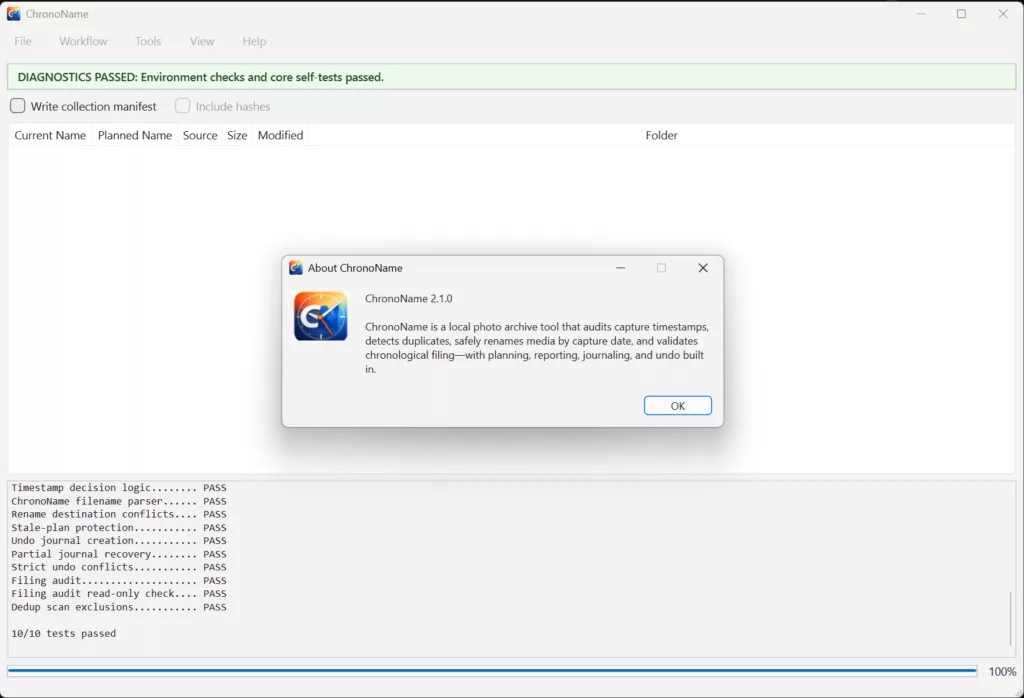
I also added built-in diagnostics to the Windows application. ChronoName can now verify its runtime environment and execute a set of self-contained core safety tests covering timestamp decisions, rename conflicts, stale-plan protection, journaling, undo behaviour, filing audits and duplicate-scan exclusions. For a standalone executable, this provides a useful distinction between a problem in the user’s environment and a failure of ChronoName’s own core logic
These changes are not exciting features visible in a screenshot. They are, however, part of the difference between code that works on the developer’s machine and an application you can responsibly hand to somebody else.
Inspect First, Change Second
That distinction also explains one of the most important design choices in ChronoName.
ChronoName does not treat discovering what could be renamed as synonymous with actually renaming it. The workflow deliberately separates:

During analysis, ChronoName determines the preferred timestamp and proposed filename without changing the source files. Conflicts and ambiguous situations can therefore be surfaced before processing. The resulting reports are not merely logs produced after the fact. They are part of the decision-making process. Only after reviewing the proposed operations does the user initiate processing.
That separation provides another important safety property. The processing stage can verify that the situation it analysed still exists. If a source file has changed or the planned destination is no longer valid, the operation should fail rather than blindly applying a stale plan.
This may sound excessively cautious for a filename utility. However, once a tool is allowed to operate across tens of thousands of personal photographs and videos, I think it becomes the appropriate default.
Reversibility Is Part of the Operation
The same reasoning applies to undo. It is tempting to regard undo as a convenience feature added after the ‘real’ functionality has been implemented. For filesystem automation, I increasingly regard it as part of the operation itself. ChronoName journals successful changes during processing, as they occur.
Imagine processing 5,000 files and encountering an unexpected failure at file 3,417. Writing the undo record from memory only after the entire batch succeeds would leave the archive in precisely the state in which undo is most valuable—but without a complete record of what happened. Incremental journaling means that successfully completed operations remain recoverable even after an interrupted run.
Undo itself is deliberately strict. If the filesystem no longer corresponds to the state ChronoName expects, it should report a conflict rather than overwrite something in an attempt to restore the previous state. Again, the principle is simple. As we say in Dutch: Bij twijfel, niet inhalen – when in doubt, do not overtake. The same principle works surprisingly well for filesystem automation: when uncertain, stop and explain rather than guess.
Renaming Is Only Half of Reconstructing a Timeline
Once filenames consistently contain their capture timestamps, another possibility emerges. The filename itself becomes useful archive metadata. ChronoName can use that information to audit whether files have ended up in the correct chronological folders. A photograph whose filename says 2019-08-14… but which resides somewhere under the 2021 archive can be detected without rewriting the photograph or trusting potentially modified filesystem timestamps.
This turns ChronoName from only a renaming application into a tool for checking the structural integrity of an existing chronological archive. The audit follows the same philosophy as the rest of the application: report first. It tells you what appears inconsistent rather than silently reorganising the archive on your behalf.
A Standalone Windows Application
Until now, using the new ChronoName meant using the Python version and therefore having an appropriate Python environment with all the dependencies installed. The Windows executable removes that requirement. For most users, that is probably the most immediately significant change in this release. You download the application, start ChronoName and use the graphical workflow without installing Python.
Underneath that simpler experience, however, is the same application architecture with timestamp analysis, deterministic planning, conflict detection, reporting, journaling, strict undo, filing audits and the hardened DedupTool engine. That was important to me. The Windows executable should not become a simplified parallel implementation of ChronoName. It should be another way of distributing the same ChronoName.
What ChronoName Is and Isn’t
ChronoName is not intended to become a photo-management ecosystem. It does not want to replace Lightroom, your DAM, your backup software or your preferred file browser. Instead, it addresses a narrower problem that tends to appear before all of those systems. How do I turn photographs and videos collected from many different sources into a coherent, chronologically organised filesystem archive?
A timestamp embedded in a filename is deliberately boring technology. It does not depend on a proprietary database. Also it survives copying files between computers. It remains understandable on Windows, Linux, a NAS or an external disk. Any file manager can sort it. Backup software does not need to understand it. And years later, the organizational information remains visible to a human simply by looking at the filename.
ChronoName adds automation around that very simple idea while trying not to sacrifice those properties.
From Script to Tool
Looking back, the interesting part of this project has not really been date formatting. The original problem could almost be summarised as find capture timestamp à rename the file.
The difficult part emerged from everything hidden inside that arrow. Which timestamp should be trusted? What happens when metadata disagree? What if the target filename already exists? How do you distinguish an occupied filename from permission failure? What happens when the filesystem changes between analysis and processing? What if processing stops halfway? How do you undo only what was actually done? How do you detect duplicates without accidentally treating visually similar memories as identical?
And eventually: How do you package all of this so that somebody without Python installed can safely use it?
Answering those questions transformed a personal renaming script into ChronoName. And perhaps that is the broader lesson from the project. Automating the happy path is often surprisingly easy. Building software that remains predictable when reality deviates from that happy path is where most of the engineering starts.
ChronoName for Windows
With this release, that development reaches another milestone. The Python application remains available for people who prefer running and inspecting the source directly. The new Windows executable provides the same workflow as a standalone desktop application.
If you have photographs and videos spread across years of phones, cameras, WhatsApp exports and other sources, ChronoName is designed to help bring those fragments back into a single chronological timeline—while keeping you, rather than the automation, in control. Analyse first. Inspect what will happen. Process deterministically. Keep a record. And make it reversible. That has become the philosophy behind ChronoName.
And the Windows version is now ready to put it into practice.
ChronoName is available both as Python source and as a standalone Windows application.
Download

The Python version of ChronoName can be downloaded here.
A summary of this article has also been published on LinkedIn.
Ask a Question or give Feedback about this article